
What to Include in a PlayBattleSquare Support Request
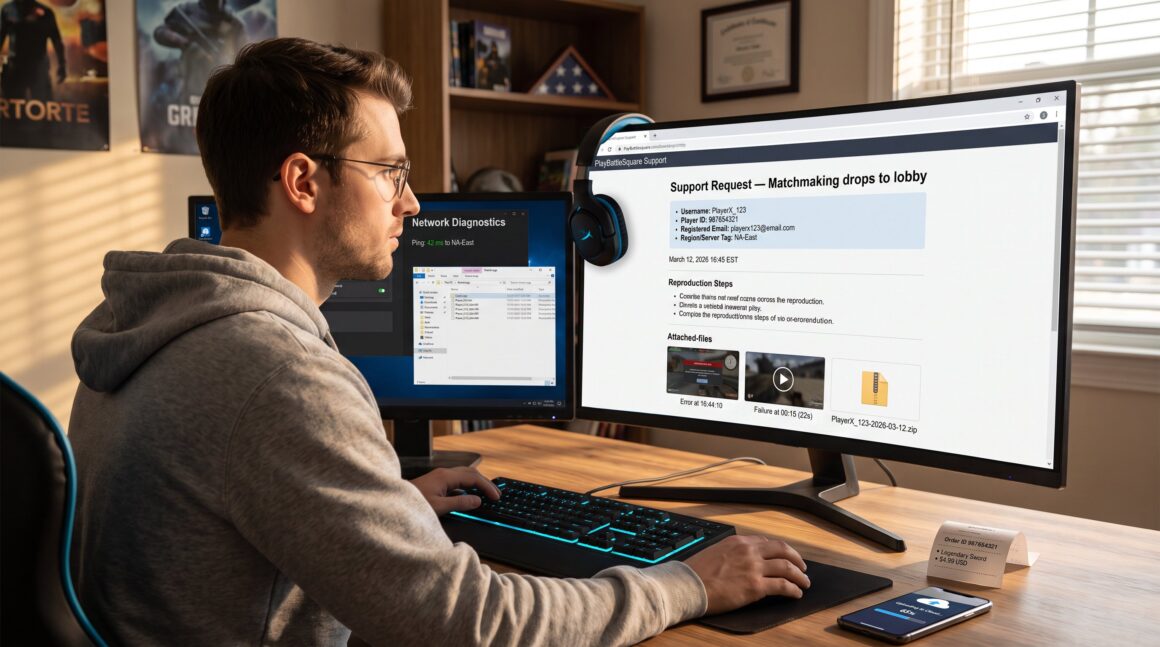
What to Include in a PlayBattleSquare Support Request helps players get faster, accurate help by sending the right details the first time. Start with account and contact details, then give a tight one-line summary and a short paragraph that explains when the problem happens. Clear steps to reproduce, a comparison of expected versus actual behavior, and supporting evidence (screenshots, clips, logs) cut response time dramatically. This guide shows exactly which fields and files to include so PlayBattleSquare staff can diagnose and fix the issue without rounds of follow-up questions.
Key Takeaways
- Including PlayBattleSquare username, player ID, and contact details upfront speeds support identification and resolution.
- A clear one-line summary plus a brief paragraph about issue timing and frequency helps prioritize the support request effectively.
- Attach screenshots, video clips, and logs with timestamps to provide evidence that accelerates diagnosis.
- Provide exact transaction details for purchase-related issues to avoid delays in billing and refund processes.
- List device model, OS version, platform account, network type, and input methods to help troubleshoot technical problems thoroughly.
- Refer to official contact pages for billing or business inquiries and upload large files using supported methods.
Essential Account And Contact Details To Include First
State the essential facts first: username, player ID, and a working email. Support teams triage by identity: missing these costs time.
Include these items at the top of every request:
- PlayBattleSquare username and numeric player ID (copy both exactly).
- Registered email address and an alternate contact (phone or secondary email) if available.
- Region or server (e.g., EU-West, NA-East), the game mode in use, and the time and date (local timezone) of the incident.
Why this matters: when a moderator looks up an account, they need an exact ID to pull match logs, purchases, and ban history. For example, a staffer resolving a duplicate-purchase dispute used the player ID to find a 2:14 PM transaction in the logs and issued a refund within 24 hours. Including region and timestamp lets staff check server-side traces for the same minute.
Tip: paste the account fields as a short list at the top of the message so they’re visible without scrolling through the whole report.
Describe The Issue Clearly And Concisely
Answer this first: what is the single problem? Start with a one-line summary, then add a focused paragraph that says when it happens and how often.
One-line summary examples:
- “Matchmaking drops to lobby on queue accept.”
- “Purchased skin not delivered to inventory.”
Follow with a short paragraph that covers: when it started, whether it’s intermittent or constant, and any recent changes (patches, account changes, new hardware). Keep this to two or three sentences.
Common rookie mistake: writing a long backstory instead of the failure. A concise summary speeds triage and reduces back-and-forth. If the issue ties to a purchase or a competitive match, note that here so support can prioritize it.
Subsections below show how to give the exact reproduction steps and a clear expected vs actual comparison.
Attach Relevant Screenshots, Video Clips, And Logs
Fact first: visual and log evidence speeds diagnosis more than text alone.
What to attach:
- Screenshots showing the error, the full UI state, and timestamps on the device clock.
- Short video clips (10–30 seconds) that show the steps and the exact moment the error appears. Add visible timestamps or narration.
- Any available game or launcher logs, saved crash dumps, or console output files.
Practical notes: crop images to show relevant UI but keep one uncropped screenshot for context. When uploading a video, note the exact timestamp where the failure happens (e.g., “failure at 00:12”). If logs are large, compress them into a ZIP and label the filename with your username and date.
Support often asks for these files. Including them up front avoided a 48-hour delay in a recent fix: a 22-second clip allowed engineers to isolate a memory leak appearing at the 15-second mark. If uploading large files is hard, link to cloud storage and include a short access note.
Add a short link to PlayBattleSquare’s contact page for supported upload options when relevant: see the support contact guidance in the site’s support overview.
Provide Transaction, Purchase, Or Order Information When Relevant
Lead with the core fact: include the full purchase record if money or items are involved.
Essential fields:
- Order or transaction ID exactly as shown.
- Item purchased, currency, and exact amount (include decimal places).
- Payment method and store (e.g., Steam wallet, PS Store, in-game card).
- Purchase date and the account used to buy.
Example: “Order ID 987654321, Legendary Sword, $4.99 USD, Steam wallet, purchased 2026-03-12 14:05 UTC.”
If a receipt email exists, paste the header lines into the support message or attach the receipt PDF. For refunds or duplicate charges, indicate whether a bank or store already shows a pending reversal.
Why this level of detail matters: billing teams reconcile external payment records against internal fulfillment logs. A mismatched currency or wrong transaction ID can add days to resolution. When in doubt, attach both the in-game receipt and the payment provider’s receipt to speed cross-checking.
List Device, Platform, And Network Details
Start with the short answer: list device model, OS, platform account, and network type.
Provide these exact fields:
- Device model and OS version (e.g., Windows 11 22H2, PS5 firmware 22.01-05.20).
- Platform account name (Xbox Gamertag, PSN ID, Steam profile) tied to the PlayBattleSquare account.
- Connection type (Wi‑Fi or Ethernet), ISP name, and approximate ping or traceroute if available.
Concrete example: “PC: Dell G15, Windows 11 22H2, Steam: PlayerX_123, Ethernet, ISP: FastNet, average ping 42 ms to NA-East.”
If the issue is a game crash or failure to launch, an external troubleshooting resource can help validate claims: many players find step-by-step fixes from PC Gamer’s troubleshooting guide useful when preparing logs for support. Attach crash dumps and mention whether third-party overlays (Discord, NVIDIA) were active.
Common omission: not listing controller or input method. If using a controller or VPN, say so. Those details are often the root cause of connection or input bugs.
Internal links for related requests: if the issue is billing, include the billing contact page in the message for cross-reference using the billing contact resource. For partnership or business-level inquiries tied to accounts, reference the business inquiry page as needed. For locating the official contact form, the contact page guide explains where to upload large files.


