Alex From Minecraft: Everything You Need to Know About the Iconic Player Character in 2026
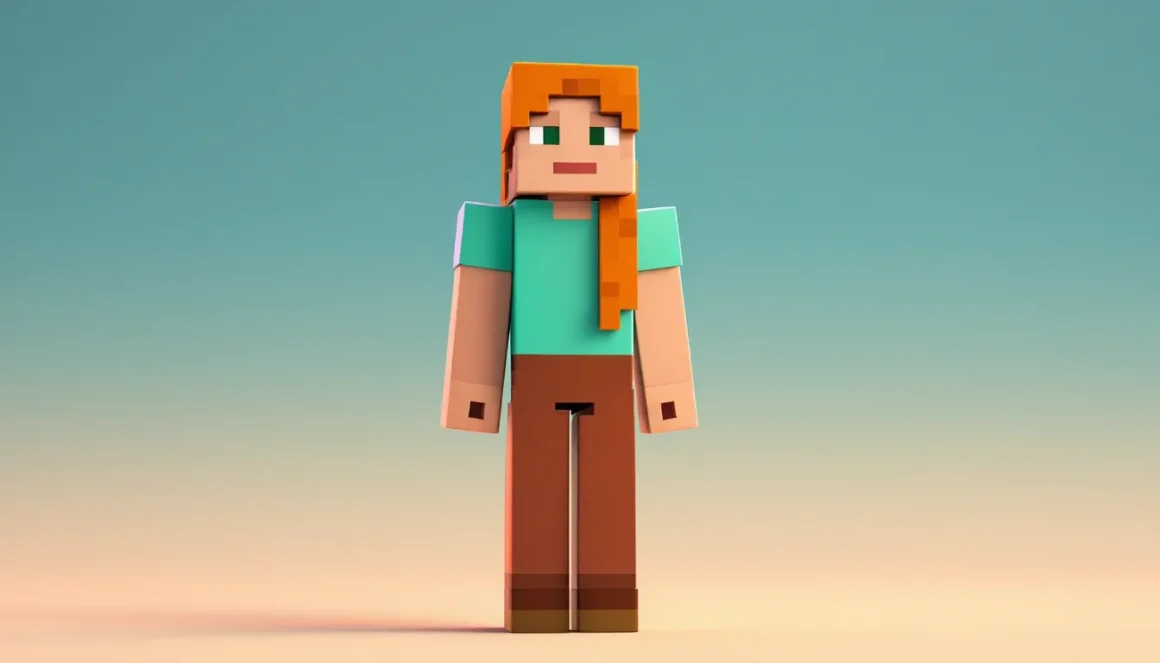
When you fire up Minecraft for the first time, the game doesn’t ask much of you, pick a skin, jump in, start punching trees. But that simple choice between two default characters has sparked years of discussion, fan art, mods, and community analysis. Alex, introduced in 2014, has become just as iconic as her counterpart Steve, representing a massive shift in how Mojang approached player representation.
Whether you’re a new player wondering why there are two default skins or a veteran curious about the design philosophy behind Alex’s creation, this guide covers everything from her origins and physical differences to how she’s embedded in Minecraft’s culture. Let’s break down the history, gameplay impact, and community significance of one of gaming’s most recognizable avatars.
Key Takeaways
- Alex from Minecraft, introduced in Java Edition 1.8 (September 2014), serves as the second default player skin alongside Steve and represents Mojang’s commitment to player representation and diversity without requiring paid DLC.
- The only meaningful technical difference between Alex and Steve is arm width—Alex has 3-pixel arms (slim model) versus Steve’s 4-pixel arms (classic model), which affects custom skin design but has zero impact on gameplay mechanics.
- Custom Alex skins can be created or downloaded from platforms like Skindex, Planet Minecraft, and MinecraftSkins.com; when uploading to Java Edition, always check the ‘slim/Alex’ model box to prevent texture stretching on arms.
- Alex’s gender-neutral design and lack of official backstory allow players to project their own identities onto the character, making her especially impactful for younger players and those seeking representation in gaming.
- Your choice to play as Alex is purely cosmetic and doesn’t affect mining speed, damage resistance, or movement, but it does influence multiplayer identity, role-play authenticity, and personal expression in creative gameplay.
- Alex appears across Minecraft’s entire ecosystem including LEGO sets, merchandise, Super Smash Bros. Ultimate, promotional materials, and community content, cementing her status as an iconic gaming avatar equally valid alongside Steve.
Who Is Alex in Minecraft?
Alex is one of the two default player skins in Minecraft, serving as an alternative to the original Steve model. Introduced in Java Edition 1.8 (released September 2, 2014) and gradually rolled out across Bedrock Edition platforms, Alex represents Mojang’s first major step toward diversifying player character options without requiring custom skins.
Unlike named characters in story-driven games, Alex doesn’t have an official backstory, dialogue, or defined personality. She’s a blank slate, an avatar for players to project themselves onto. The name “Alex” itself is gender-neutral, intentionally leaving interpretation open. Mojang has never assigned a specific gender to either default skin, maintaining that both Steve and Alex are simply “Minecraft characters.”
The History and Origins of Alex
Before Alex’s arrival, Steve was the sole default skin since Minecraft’s early alpha days. The character’s blocky, bearded design became synonymous with the game itself, appearing on merchandise, promotional materials, and fan creations worldwide.
Mojang developer Jens Bergensten first teased Alex in August 2014, posting concept art on social media. The community response was mixed, some players celebrated the addition, while others questioned why the change was necessary. Alex officially launched with the Java Edition 1.8 “Bountiful Update,” which also introduced ocean monuments, banners, and armor stands.
The rollout wasn’t simultaneous across all platforms. Console editions received Alex later, with PlayStation and Xbox versions updating throughout 2015. Pocket Edition (now Bedrock Edition on mobile) added Alex in version 0.11.0 in June 2015. This staggered release meant that for months, the Minecraft experience varied depending on your platform, a reminder of how fragmented the game’s ecosystem once was before the Bedrock unification push.
Why Mojang Added Alex as a Default Skin
Mojang’s official explanation focused on player choice and representation. In a 2014 blog post, the development team stated they wanted “all players to feel equally represented” when starting the game. Steve’s distinctly masculine design, complete with beard and broader build, didn’t resonate with everyone, particularly younger players and those seeking more diverse avatar options.
The decision also aligned with broader gaming industry trends in 2014. Major franchises like Assassin’s Creed and Far Cry were facing criticism for lack of playable female characters, and Mojang wanted to avoid similar backlash. By making Alex a default option rather than a DLC or premium skin, they signaled that diverse representation was core to the Minecraft experience, not an afterthought.
From a technical standpoint, adding Alex required minimal resources. The skin uses the same UV mapping and texture resolution as Steve, ensuring compatibility with existing custom skin tools and mods. The only substantive change was the arm width, a detail that would become one of Alex’s most discussed features.
Alex vs. Steve: Key Differences Between the Two Default Skins
At a glance, Alex and Steve look like simple palette swaps. But look closer and you’ll notice deliberate design choices that distinguish them beyond hair color and clothing.
Physical Appearance and Design Variations
The most obvious differences are cosmetic:
- Hair: Alex has long orange hair styled in a ponytail, while Steve sports short dark brown hair and a beard.
- Clothing: Alex wears a light green shirt with brown pants, compared to Steve’s light blue shirt and purple-blue pants.
- Eyes: Both share the same basic eye design, but Alex’s skin tone is slightly lighter with a warmer hue.
- Expression: Neither character has a defined facial expression beyond their basic pixelated features, maintaining the minimalist aesthetic.
These visual distinctions are subtle enough that both characters feel like they belong in the same universe, yet distinct enough that players can easily identify which skin they or another player is using in multiplayer.
Arm Width and Model Differences
Here’s where things get technical. Alex’s arms are 3 pixels wide, while Steve’s are 4 pixels wide. This single-pixel difference might seem trivial, but it has meaningful implications for skin creators and modders.
The narrower arm model (often called the “slim” or “Alex” model) was introduced specifically to provide an alternative body type. When creating custom skins, players must now choose between two base models:
- Classic (Steve) model: 4-pixel-wide arms, traditionally associated with more masculine builds
- Slim (Alex) model: 3-pixel-wide arms, providing a lighter frame option
This distinction affects how custom skins are rendered. A skin designed for the Steve model will look distorted on an Alex-model character, with textures stretched or compressed incorrectly on the arms. Most skin databases like Nexus Mods and other community platforms now require creators to specify which model their skins support.
From a gameplay perspective, the arm width makes zero functional difference. Alex doesn’t mine faster, punch harder, or move differently than Steve. The hitbox, reach distance, and all gameplay mechanics are identical. This was an intentional design choice by Mojang to ensure that skin selection remained purely cosmetic, never affecting competitive balance or survival mechanics.
How to Select and Use the Alex Skin
Switching to Alex is straightforward, but the exact process varies depending on your platform and Minecraft edition.
Switching Between Alex and Steve on Different Platforms
Java Edition (PC/Mac/Linux):
- Launch Minecraft Java Edition
- Click “Skins” from the main menu
- Select either “Steve” or “Alex” from the default options
- Click “Use Selected Skin” to confirm
Java Edition also allows you to upload custom skins directly through the launcher or via your Minecraft.net profile page.
Bedrock Edition (Windows 10/11, Xbox, PlayStation, Switch, Mobile):
- Open Minecraft and navigate to the Profile/Dressing Room
- Select “Edit Character”
- Choose “Classic Skins”
- Select “Alex” from the available defaults
- Confirm your choice
Bedrock Edition uses a unified character creator that syncs across all platforms tied to your Microsoft account. If you select Alex on Xbox, that choice carries over to your mobile device and Windows 10/11 version.
Legacy Console Editions (PS3, Xbox 360, Wii U):
These discontinued versions have limited skin options. Alex is available but cannot be customized beyond selecting the default skin from the character menu. These editions no longer receive updates as of 2020.
Customizing Your Alex Skin
The real flexibility comes from custom skins built on the Alex model. Here’s how to create or apply them:
Applying Existing Custom Skins:
- Java Edition: Download a .png skin file designed for the Alex/slim model, then upload it via the Minecraft launcher or your profile page at Minecraft.net.
- Bedrock Edition: Custom skins must be imported through the character creator. On mobile and console, this requires converting the skin to a compatible format and importing it manually.
Creating Your Own:
Skin editors like Skindex, Miners Need Cool Shoes, or dedicated software like Nova Skin allow you to design custom Alex-based skins. Key tips:
- Start with an Alex template to ensure proper arm width mapping
- Use the 64×64 pixel texture format (modern standard as of Java 1.8+)
- Test your skin in-game before sharing, what looks good in the editor can render differently
Model Selection Matters:
When uploading a custom skin to Java Edition, you’ll see a checkbox labeled “Alex” or “Slim.” Check this if your skin is designed for the 3-pixel arm model. Forgetting this step is the most common mistake new skin creators make, resulting in stretched or misaligned textures.
Alex’s Role in Minecraft Lore and Community Culture
Minecraft doesn’t have traditional lore in the way most games do, no cutscenes, no dialogue trees, no canonical story. Yet the community has built an entire mythology around its simplest elements, and Alex sits at the center of much of that discussion.
Representation and Inclusivity in Gaming
Alex’s introduction in 2014 came during a pivotal moment for gaming representation. The industry was beginning to reckon with decades of male-default character design, and Mojang’s decision to add a second default skin without fanfare or monetization was notable.
What made the move particularly effective was its simplicity. Mojang didn’t market Alex as a “female character” or tie her to any specific identity. The name is gender-neutral, the design is stylized enough to avoid reinforcing stereotypes, and the implementation treated both skins as equally valid starting points. This approach allowed players to project their own identities onto the character without feeling constrained by developer-imposed narratives.
The gaming community’s response evolved over time. Initial skepticism from some corners of the fanbase gave way to widespread acceptance. Today, Alex appears alongside Steve in official Minecraft promotional materials, merchandise, and even the tier lists and meta discussions that dissect every aspect of the game. She’s featured in LEGO sets, plush toys, clothing lines, and the mobile Minecraft Earth AR game (discontinued in 2021).
For younger players especially, having a choice of default skin normalizes the idea that gaming avatars don’t need to look the same. Educators using Minecraft in classroom settings have noted that offering both options reduces barriers to engagement for students who might not have seen themselves represented in games before.
Fan Theories and Community Interpretations
The lack of official lore hasn’t stopped players from crafting their own narratives. Popular fan theories about Alex include:
- The Survivor Theory: Alex and Steve are the last survivors of an ancient civilization, evidenced by the abandoned villages and structures scattered throughout the world.
- The Respawn Connection: Some players theorize that Alex and Steve are the same consciousness experiencing different forms, explaining the respawn mechanic and the arbitrary nature of choosing between them.
- The Builder vs. Explorer Dynamic: Fan fiction and YouTube content often position Steve as the builder/fighter archetype and Alex as the explorer/collector, though this has no basis in actual gameplay mechanics.
Minecraft YouTube and content creation has amplified these interpretations. Channels with millions of subscribers feature Alex and Steve in animated storylines, machinima series, and role-play scenarios. The Dream SMP and similar multiplayer storytelling servers occasionally feature players using Alex skins as part of their character personas, further embedding her in community culture.
Artists on platforms like DeviantArt and Twitter have created thousands of variations on Alex’s design, reimagining her in different art styles, crossover scenarios, and narrative contexts. This creative output demonstrates how a simple 64×64 pixel texture can become a canvas for community expression.
Popular Alex Skin Variations and Custom Designs
The Alex model has spawned countless custom variations, from subtle tweaks to complete overhauls. Here are the most popular categories:
Outfit Variations:
- Seasonal clothing (winter coats, summer wear, holiday themes)
- Armor-integrated designs that make Alex appear to be wearing diamond, netherite, or custom gear even when she isn’t
- Profession-themed skins (farmer, miner, wizard, knight)
Crossover Skins:
- Video game character adaptations (Link from Zelda, Samus from Metroid, etc.)
- Anime and manga characters redesigned in Minecraft’s blocky aesthetic
- Movie and TV show characters
Fantasy and Sci-Fi:
- Elven, dwarven, and other fantasy race interpretations
- Cyberpunk and futuristic variants
- Superhero and villain designs
Realistic and HD:
- Higher-detail versions that push Minecraft’s texture limits
- Photorealistic face and clothing textures (work best with HD skin mods)
Where to Find the Best Alex-Based Custom Skins
Several platforms dominate the custom skin ecosystem:
The Skindex: One of the oldest and largest skin databases, with robust filtering options. You can search specifically for Alex/slim model skins and sort by popularity, date, or rating.
Planet Minecraft: Community-driven site with user ratings and comments. Good for finding high-quality, curated skins and following specific creators.
MinecraftSkins.com: Simple interface with direct download links. Less curated than other platforms but has a massive library.
NameMC: Primarily a player lookup tool, but also tracks popular skins across servers. Great for finding what top players and content creators are using.
When browsing, always check:
- Model compatibility (Alex/slim vs. Steve/classic)
- Resolution (64×64 is standard: higher resolutions require mods)
- Preview images from multiple angles
- User ratings and download counts as quality indicators
Creating Your Own Alex-Inspired Skin
Building a custom skin is more accessible than it looks. Here’s a streamlined process:
-
Choose Your Editor: Nova Skin and Miners Need Cool Shoes offer browser-based tools with no download required. For more control, use dedicated software like Paint.NET or GIMP with Minecraft skin templates.
-
Start With a Template: Download an existing Alex skin as your base. This ensures correct pixel dimensions and arm width.
-
Plan Your Design: Sketch out your concept. Remember that Minecraft’s blocky geometry means fine details often get lost. Bold colors and clear shapes work best.
-
Work in Layers: Most skin editors support layers. Build your design incrementally, base color, then shading, then details.
-
Test Frequently: Import your work-in-progress skin into Minecraft regularly. What looks good in 2D can render unexpectedly in 3D, especially around joints and the face.
-
Mind the Outer Layer: Minecraft skins have a second, transparent outer layer for accessories like hats, glasses, or jackets. Use this for details that should stand slightly off the base model.
-
Get Feedback: Share your skin on Reddit’s r/minecraftskins or dedicated Discord communities before publishing. Fresh eyes catch issues you’ll miss.
The slim arm model requires special attention around the shoulders and wrists, where the narrower width can cause textures to look stretched compared to how they appear in your editor. Test these areas especially carefully.
Alex in Minecraft Merchandise and Media
Alex’s reach extends far beyond the game itself. Mojang and Microsoft have integrated her into nearly every aspect of Minecraft’s commercial and media presence.
Physical Merchandise:
LEGO Minecraft sets feature Alex minifigures alongside Steve in dozens of sets, from small starter packs to massive $200+ builds. Action figures, plush toys, and collectible vinyl figures from brands like Mattel and Funko include Alex variants. Clothing lines at retailers like Target and Hot Topic offer Alex-themed apparel for kids and adults.
Books and Guides:
Official Minecraft guidebooks published by Del Rey and Egmont include Alex in illustrations and cover art. The novel series (Minecraft: The Island, The Crash, etc.) doesn’t feature the default skins as characters, but Alex appears in promotional materials and some fan discussions position her as a potential protagonist interpretation.
Animation and Video:
The upcoming Minecraft movie (slated for 2026 release as of current announcements) has not confirmed whether Alex or Steve will appear as characters versus simply existing as player avatar references. Previous animated Minecraft content, including YouTube’s official Minecraft channel and promotional videos, regularly feature both skins.
Crossover Appearances:
Alex appears as a playable character or skin in:
- Super Smash Bros. Ultimate: Added as an alternate skin for the Steve fighter in October 2020
- Minecraft Dungeons: Available as a player appearance option in the action-RPG spinoff
- Various Minecraft spinoff mobile games before their discontinuation
Community Content:
YouTubers and streamers often use Alex-based skins for their personas. Some of Minecraft’s biggest content creators have signature custom skins built on the Alex model, which their audiences immediately recognize. This has turned certain Alex variants into minor cultural icons within specific fanbase communities.
The merchandising strategy treats Alex and Steve as co-equals, a marked difference from how many games handle default characters. Neither is positioned as primary or secondary, which reinforces Mojang’s stated goal of equal representation.
Tips for Playing as Alex: Does Your Skin Choice Matter?
Let’s cut through any confusion: choosing Alex over Steve (or any custom skin) has absolutely zero impact on gameplay mechanics. Your skin is purely cosmetic. You don’t mine slower, take more damage, run faster, or have any altered stats based on your avatar’s appearance.
That said, skin choice can affect your experience in subtle social and psychological ways:
Multiplayer Identity:
Your skin is how other players recognize you on servers. A distinctive custom Alex skin helps you stand out in crowded multiplayer lobbies, making it easier for friends to spot you and for your reputation (good or bad) to build on community servers. Default skins, while iconic, are common enough that you might get confused with other players.
Role-Play Servers:
On RP-focused servers, your skin is part of your character presentation. Many servers have rules requiring skins that match your character’s role or faction. Alex-based medieval, fantasy, or modern skins are popular choices for these environments, and some servers provide recommended skin galleries on community guides to help new players fit the theme.
Streaming and Content Creation:
If you’re creating Minecraft content, your skin becomes part of your brand. Many successful YouTubers use custom Alex or Steve variants that are instantly recognizable to their audience. Consistency matters, changing skins frequently can confuse viewers who use visual cues to follow the action.
Personal Expression:
This is the real reason skin choice matters. Minecraft is a creative sandbox, and your avatar is an extension of that creativity. Whether you stick with default Alex, customize her slightly, or build something entirely original on the slim model, your skin is a form of self-expression in a game built around individual creativity.
Cross-Platform Considerations:
If you play across multiple devices, Bedrock Edition’s synced skins mean your choice travels with you. Java Edition requires manual skin uploads on each installation, which can be a minor hassle if you play from multiple computers.
Bottom line: Choose the skin that makes you happy. The game mechanics won’t change, but your enjoyment might. Minecraft is fundamentally about building your own experience, and that starts with how you represent yourself in the world.
Conclusion
Alex’s journey from a 2014 update to a gaming icon represents more than just an additional default skin. She’s evidence that thoughtful representation can be integrated into games without complexity or controversy, just quiet inclusion that expands who gets to see themselves as the default.
Whether you main Alex, prefer Steve, or rock a custom skin entirely, the choice reflects Minecraft’s core philosophy: the game is what you make of it. Your avatar is the lens through which you experience millions of procedurally generated blocks, and having options for that lens matters.
As Minecraft continues evolving in 2026 and beyond, Alex remains a fixture in official materials, merchandise, and community creations. She’s not going anywhere, and given Mojang’s track record, we’ll likely see continued refinement of character customization options that build on the foundation she helped establish. For now, she’s proof that sometimes the most impactful changes are the ones that simply give players one more way to feel at home in the worlds they build.