Distant Horizons Minecraft: The Ultimate Guide to Rendering Infinite Worlds in 2026
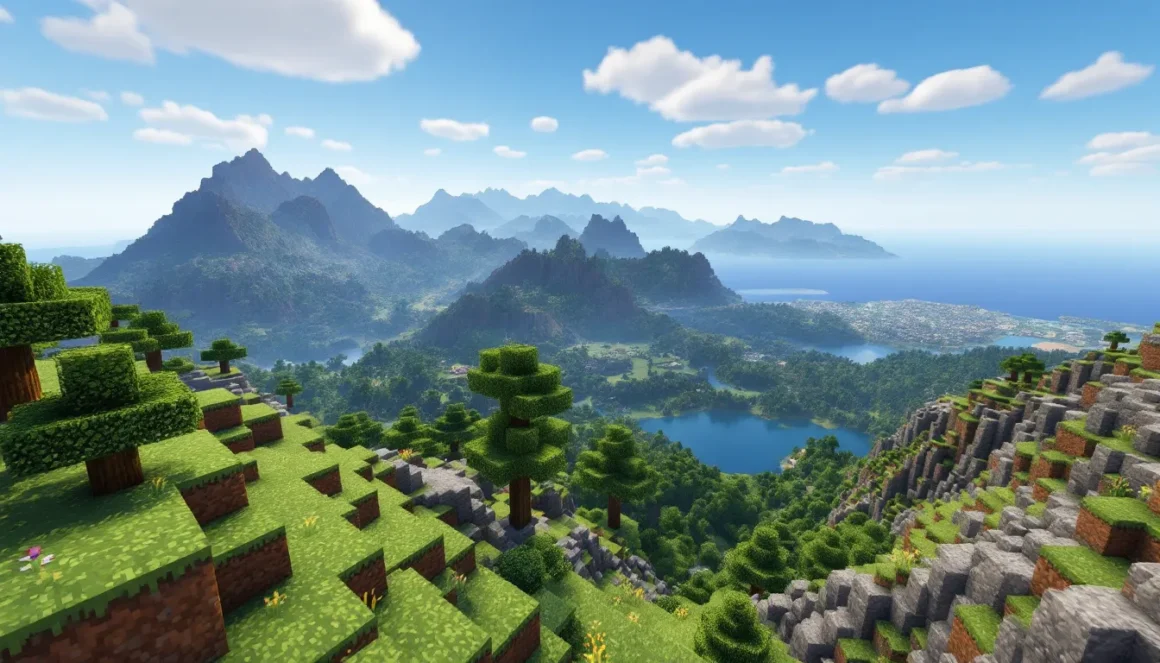
Minecraft’s default render distance maxes out at 32 chunks, creating that familiar fog wall on the horizon. It’s functional, but it’s also immersion-breaking, especially when you’re standing on a mountain peak or sailing across an ocean and can’t see where you’re actually heading. Enter Distant Horizons, the mod that fundamentally changes how far you can see in Minecraft without melting your GPU.
Since its initial release, Distant Horizons has evolved into one of the most technically impressive mods in the community. The latest version in 2026 supports both Forge and Fabric, works alongside major shader packs, and can render terrain thousands of chunks away using level-of-detail (LOD) technology. Whether you’re exploring massive custom maps, building sprawling cities, or just want to see that village across the plains, this mod delivers what vanilla Minecraft can’t.
This guide breaks down everything: how the mod actually works, installation steps that won’t waste your time, configuration tweaks for your specific hardware, and compatibility with shaders and other popular mods. No filler, just the practical details you need to extend your render distance into the stratosphere.
Key Takeaways
- Distant Horizons mod extends Minecraft’s render distance from 32 chunks to 1024 chunks using LOD (level-of-detail) technology, allowing you to see mountains and landmarks dozens of kilometers away without overwhelming your GPU.
- Installation is straightforward on both Forge and Fabric loaders, requiring just 10 minutes of setup plus optional configuration tweaking to match your hardware performance targets.
- The mod delivers better frame rates than vanilla high render distances because LOD chunks use 90%+ fewer polygons and reduced textures, often achieving 80-100 FPS compared to 40-60 FPS at vanilla 32-chunk distance.
- Distant Horizons works seamlessly on multiplayer servers as a client-side mod without requiring server installation, and it’s compatible with major shader packs like Complementary, BSL, and Sildur’s Vibrant Shaders.
- Configuration for different hardware levels (low-end at 64 chunks, mid-range at 128-192 chunks, high-end at 384-512 chunks) ensures optimal performance while transforming exploration, navigation, and cinematic gameplay experiences.
What Is the Distant Horizons Mod?
Distant Horizons is a client-side Minecraft mod that extends render distance far beyond vanilla limits by using level-of-detail (LOD) rendering. Instead of loading every block at full fidelity like the base game, it generates simplified versions of distant terrain, think lower-resolution textures and reduced geometry, allowing you to see hundreds or even thousands of chunks away without the performance hit that normally comes with cranking up render distance.
The mod is designed as a drop-in enhancement. It doesn’t alter world generation, affect server-side mechanics, or require anything special from multiplayer hosts. You install it, boot up Minecraft, and suddenly the world feels massive again. Mountains appear on the horizon dozens of kilometers away, oceans stretch to realistic distances, and you can actually navigate by landmarks instead of coordinates.
As of version 2.1 (released in early 2026), Distant Horizons supports Minecraft 1.20.x through 1.21.x on both Forge and Fabric loaders. It’s compatible with most major mods and has built-in integrations with popular shader packs, though results vary depending on your setup.
How Distant Horizons Works Behind the Scenes
The magic happens through LOD (Level of Detail) rendering. When you move through the world, Distant Horizons caches terrain data and creates simplified mesh representations of chunks outside your vanilla render distance. These LOD chunks use dramatically fewer polygons and lower-res textures, which means your GPU can render them with minimal overhead.
Here’s the process:
- Chunk Caching: As you explore, the mod saves terrain data locally. It doesn’t need the server to send full chunk data repeatedly, once you’ve visited an area, it’s stored.
- LOD Generation: Distant chunks are converted into low-poly meshes. A 16x256x16 chunk might reduce to a handful of vertices for terrain shape and basic color data.
- Rendering Pipeline: The mod hooks into Minecraft’s rendering engine and draws LOD chunks behind the vanilla render distance. Transitions between full-detail and LOD terrain are blended to minimize pop-in.
- Dynamic Updates: If terrain changes (you blow up a mountain, someone builds a structure), the mod updates LOD data on the fly, though there’s a slight delay depending on your CPU.
This approach is fundamentally different from Optifine’s extended render distance, which tries to render every chunk at full quality and destroys frame rates in the process.
Key Features That Set It Apart
Distant Horizons isn’t just about seeing farther, it’s about doing it smartly. Here’s what separates it from other rendering mods:
- LOD Quality Levels: Adjustable from “Potato” to “Extreme,” letting you balance visual fidelity against performance. Lower settings reduce terrain to basic shapes: higher settings preserve more detail.
- Vertical Scaling: Unlike some older mods, Distant Horizons properly handles Minecraft’s 384-block build height (introduced in 1.18). You’ll see tall mountains and deep caves rendered correctly at distance.
- Multiplayer-Friendly: Works on any server without server-side installation. The mod uses client-side caching, so you only need to explore an area once.
- Shader Integration: Direct support for Iris (Fabric) and Oculus (Forge) shader loaders, with specific compatibility patches for popular packs like BSL, Complementary, and Seus PTGI.
- Configurable Radius: Extend LOD rendering from 64 chunks all the way to 1024 chunks (16,384 blocks). Yes, you can see 16 kilometers in every direction if your hardware can handle it.
- Transparency Handling: Recent versions support transparent blocks (water, glass, leaves) in LOD chunks, fixing the “solid ocean” problem from earlier releases.
The mod is actively maintained, with frequent updates addressing bugs and adding features. Development happens primarily on Nexus Mods, where you’ll find the latest builds and community feedback.
Why Every Minecraft Player Should Consider Distant Horizons
Most visual mods are luxury additions, nice to have, but not game-changing. Distant Horizons falls into a different category. It solves problems you might not even realize you’ve been tolerating.
Enhanced Visual Immersion and Exploration
The vanilla fog wall kills exploration momentum. You crest a hill, hoping to spot a structure or biome, and instead you see… nothing. Just a gray void 512 blocks away. Distant Horizons removes that limitation entirely.
With LOD rendering active, you can:
- Spot landmarks from spawn: See that jungle temple or desert pyramid from thousands of blocks away, making navigation intuitive instead of coordinate-dependent.
- Appreciate megabuilds properly: Massive player-created structures (castles, cities, terraformed landscapes) finally render at appropriate scales. You can stand back and actually see what you built.
- Plan travel routes visually: Sailing across oceans or flying with an elytra becomes strategic. You see islands, continents, and mountain ranges before you reach them.
- Experience true scale: Minecraft worlds feel properly massive. The game was always meant to have vast, explorable terrain, now it looks that way.
For content creators, this is transformative. Screenshots and videos gain cinematic scope. That timelapse of your build now shows context: the surrounding landscape, neighboring biomes, and the world stretching to the horizon.
Performance Benefits Over Traditional Render Distance
Counterpoint to expectations: Distant Horizons often runs better than pushing vanilla render distance to its limits.
Vanilla Minecraft at 32-chunk render distance tries to render every block, every entity, and every lighting calculation within that sphere. It’s brute-force rendering, and it hammers your CPU and GPU simultaneously. You’ll see frame rates drop into the 40s or lower on mid-range hardware.
Distant Horizons at 128-chunk LOD distance (four times farther) uses a fraction of the resources because:
- Simplified geometry: LOD chunks have 90%+ fewer polygons than full-detail chunks.
- Reduced texture memory: Distant terrain uses lower-resolution textures or even flat colors for extreme distances.
- Static data: Cached LOD chunks don’t recalculate lighting or entity positions every frame.
- Intelligent culling: The mod only renders what’s actually visible, aggressively culling geometry behind mountains or below the horizon.
Real-world impact: A mid-range system (Ryzen 5 5600X, RTX 3060) might get 60-70 FPS at vanilla 32-chunk render distance. With Distant Horizons set to 24-chunk vanilla + 192-chunk LOD, you’ll see 80-100 FPS, higher frame rates with a more expansive view. The tradeoff is initial terrain generation (one-time cost) and minor pop-in when detail levels transition.
How to Install Distant Horizons Mod in 2026
Installation is straightforward if you’ve modded Minecraft before. If you haven’t, this is a solid first mod to learn with, it doesn’t require complex dependencies or configs out of the box.
Prerequisites and System Requirements
Before downloading anything, confirm your setup:
Minecraft Version: Distant Horizons 2.x supports 1.20.1, 1.20.4, 1.20.6, and 1.21.x. Check the mod page for the exact version compatibility matrix.
Mod Loader: You need either Forge or Fabric installed. Fabric is generally lighter and faster: Forge has broader mod compatibility. Pick based on your other mods.
- Fabric: Install Fabric Loader 0.15.x+ and Fabric API (required dependency).
- Forge: Install Forge 47.x.x+ (for 1.20.x) or the latest build for your version.
Recommended Specs:
- CPU: Quad-core or better (Ryzen 5 / Intel i5 minimum). LOD generation is CPU-intensive during initial world exploration.
- GPU: GTX 1660 / RX 580 or better for comfortable performance at 128+ chunk LOD distance.
- RAM: Allocate at least 6GB to Minecraft. LOD caching uses extra memory: 8GB allocation is ideal for large render distances.
- Storage: SSD strongly recommended. LOD data writes to disk, and HDDs will bottleneck caching.
Shader Support (Optional): If you want shaders, install Iris (Fabric) or Oculus (Forge) before adding Distant Horizons. Compatibility works best when both are present at first launch.
Step-by-Step Installation Process
- Install Your Mod Loader
Download and run the Fabric or Forge installer for your Minecraft version. Launch Minecraft once with the new profile to ensure it works.
- Download Distant Horizons
Grab the latest build from CurseForge, Modrinth, or the official GitHub releases. Make sure the file name matches your Minecraft version and mod loader.
- Install Dependencies
- Fabric users: Download Fabric API and place it in your
modsfolder. - Forge users: Most dependencies are bundled, but check the mod page for any required libraries.
- Add the Mod File
Navigate to your Minecraft directory (.minecraft on Windows, ~/Library/Application Support/minecraft on Mac).
Drop the Distant Horizons .jar file into the mods folder. If the folder doesn’t exist, create it.
- Allocate More RAM
Open your Minecraft launcher, edit the Fabric/Forge profile, and adjust JVM arguments. Replace -Xmx4G with -Xmx8G (or your desired allocation). Example:
-Xmx8G -XX:+UnlockExperimentalVMOptions -XX:+UseG1GC -XX:G1NewSizePercent=20
- Launch and Verify
Start Minecraft with your modded profile. On the main menu, press ESC → Options → Distant Horizons Settings. If the menu appears, installation succeeded.
Troubleshooting Common Installation Issues
Problem: Minecraft crashes on startup with a “mod conflict” or “class error.”
Fix: You likely have incompatible mods. Remove other rendering mods (Optifine, Sodium forks without compatibility patches) and test. Distant Horizons works with Sodium (Fabric) but requires the compatibility build from Modrinth.
Problem: The mod loads, but LOD terrain doesn’t appear.
Fix: LOD data generates as you explore. Fly around for a few minutes to populate the cache. Also check in-game settings: Options → Distant Horizons → Enable Distant Generation should be ON.
Problem: Game stutters or freezes when flying quickly.
Fix: LOD generation is CPU-bound. Lower LOD Builder Thread Count in settings (try 50% of your core count). Also reduce LOD Generation Distance temporarily while exploring new areas.
Problem: Shaders don’t display LOD terrain correctly.
Fix: Not all shader packs support Distant Horizons. Check the “Compatibility” section later in this guide for confirmed working packs. Make sure both Iris/Oculus and Distant Horizons are up-to-date.
Configuring Distant Horizons for Optimal Performance
Default settings are conservative, they work, but they don’t take advantage of your hardware. Tuning the config is where Distant Horizons really shines.
Adjusting Render Distance and LOD Settings
Access settings via Options → Video Settings → Distant Horizons (exact path varies by launcher).
Key Settings Explained:
- Distant Generation Distance: How far the mod generates LOD chunks (in chunks). Start at
128for a balanced view, push to256or512if your CPU handles it. - LOD Render Distance: How far LOD chunks actually render. Set this equal to or slightly higher than generation distance. Max practical value is around
1024chunks (16km). - Vertical Quality: Controls LOD detail for vertical structures (mountains, builds). Options:
Low,Medium,High,Extreme.Mediumis usually sufficient:Highadds minimal visual gain for 20-30% more overhead. - Horizontal Quality: Similar to vertical, but for terrain flatness and color accuracy.
MediumorHighrecommended. - LOD Builder Threads: How many CPU threads generate LOD data. Set to 50-75% of your core count. More threads = faster generation but higher CPU usage. For an 8-core CPU, try
4-6threads.
Quick Presets:
- Balanced (Most Users): Generation Distance
128, Render Distance128, QualityMedium, Threads4 - Performance (Low-End): Generation
64, Render96, QualityLow, Threads2 - Ultra (High-End): Generation
512, Render512, QualityHigh, Threads8
Balancing Graphics Quality and Frame Rates
LOD quality has a direct FPS impact. Here’s the hierarchy from least to most expensive:
- LOD Render Distance: Biggest performance factor. Doubling distance roughly halves frame rate at extreme values (512+).
- Quality Settings:
Low→Extremecosts 15-40 FPS depending on scene complexity. - Transparency: Rendering water/glass in LOD chunks costs 10-20 FPS. Disable if you need frames.
- Generation Threads: Only affects stuttering during generation, not steady-state FPS.
Optimization Strategy:
- Run Minecraft at your normal settings, note your baseline FPS.
- Set Distant Horizons to
Generation 128 / Render 128 / Medium Quality. - If FPS drops below 60, lower render distance by 32 chunks at a time until stable.
- If FPS stays above 80, increase render distance or quality incrementally.
Advanced Tweaks:
- Fog Start/End: Adjust in shader settings or Distant Horizons config to hide LOD transition lines. Set fog start at 75% of vanilla render distance.
- Cave Culling: Enable
Skip Rendering Undergroundto avoid wasting GPU on caves you can’t see. Saves 10-15% GPU load. - Update Frequency: Reduce how often LOD chunks refresh.
SloworManualmodes prevent stuttering in multiplayer.
Best Settings for Low-End vs High-End PCs
Low-End (Integrated Graphics, Older GPUs):
Target: 45-60 FPS in normal gameplay.
- Vanilla Render Distance:
12-16chunks - LOD Generation:
64chunks - LOD Render:
96chunks - Quality:
LoworPotato - Threads:
2 - Disable transparency, set update frequency to
Manual
You’ll still see 1.5km farther than vanilla, which is a massive upgrade.
Mid-Range (GTX 1660, RX 5600, RTX 3050):
Target: 60-90 FPS with good visual quality.
- Vanilla Render Distance:
16-24chunks - LOD Generation:
128-192chunks - LOD Render:
192chunks - Quality:
Medium - Threads:
4-6 - Transparency enabled,
Balancedupdate frequency
Sweet spot for most players. You get 3km+ view distance without sacrificing fluidity.
High-End (RTX 3080+, RX 6800 XT+):
Target: 100+ FPS with maximum eye candy.
- Vanilla Render Distance:
24-32chunks - LOD Generation:
384-512chunks - LOD Render:
512chunks - Quality:
HighorExtreme - Threads:
8-12 - All features enabled, pair with high-end shaders
You can see 8km+ and maintain triple-digit frame rates. This is where Distant Horizons truly flexes.
Compatibility with Shaders and Other Mods
Distant Horizons plays nicely with most mods, but shaders and rendering-related mods require special attention. Not all combinations work out of the box.
Top Shader Packs That Work with Distant Horizons
As of version 2.1, Distant Horizons has official compatibility with Iris (Fabric) and Oculus (Forge) shader loaders. But, individual shader packs need explicit LOD support. Here’s the current compatibility tier list:
Fully Compatible (LOD Terrain Renders Correctly):
- Complementary Shaders (v5.2+): Best overall compatibility. LOD chunks blend seamlessly with vanilla terrain, proper fog transitions, and accurate lighting.
- BSL Shaders (v8.2+): Excellent performance, good color matching. Minor water rendering quirks at extreme distances.
- Sildur’s Vibrant Shaders (v1.50+): Works well on both low and high presets. LOD terrain matches vanilla aesthetics closely.
- AstraLex Shaders: Newer pack with native Distant Horizons support. Good for mid-range hardware.
- MakeUp Ultra Fast: Performance-oriented shader that maintains 100+ FPS even with 256-chunk LOD render distance.
Partial Compatibility (Works with Tweaks):
- Seus PTGI: Requires disabling certain advanced lighting features. LOD terrain appears but lacks path-traced lighting. Still looks phenomenal.
- Seus Renewed: Older version works better than PTGI. Expect minor color mismatches at LOD boundaries.
- Vanilla Plus Shaders: Basic compatibility. No fancy effects on LOD chunks, but functional.
Incompatible or Broken:
- Optifine: Does not work with Distant Horizons. Use Iris/Oculus instead. Optifine’s closed-source rendering conflicts with LOD hooks.
- Older Continuum versions: Pre-2025 builds lack LOD support entirely. Check for updated releases.
Installation Tip: Always install your shader loader (Iris/Oculus) before Distant Horizons. Let Iris initialize first, then add the mod. Some shader packs require enabling “Distant Horizons Support” in their settings menu.
Popular Mod Combinations for Enhanced Gameplay
Distant Horizons integrates well with the broader modding ecosystem. Here are tested combinations:
Performance Stack (Fabric):
- Sodium: Optimizes Minecraft’s base rendering. Distant Horizons has a dedicated compatibility patch, download from Modrinth.
- Lithium: Server-side optimizations that reduce world generation overhead. Helps with LOD chunk creation.
- Starlight: Faster lighting engine. Reduces stuttering when LOD chunks update.
- FerriteCore: Memory optimizations. Important when running high LOD render distances.
This stack can push frame rates 50-80% higher than vanilla Fabric + Distant Horizons alone.
Visual Enhancement Stack:
- Terralith / Biomes O’ Plenty: World generation overhauls. Distant Horizons makes these biomes visible from incredible distances, showcasing their full scope.
- Dynamic FPS: Reduces CPU/GPU usage when Minecraft is in the background. Saves power during long LOD generation sessions.
- Bobby: Extends server-side render distance beyond what servers allow. Pairs with Distant Horizons to cache even multiplayer terrain.
Builder’s Toolkit:
- WorldEdit: Terrain manipulation at scale. Combined with Distant Horizons, you can see your edits update in real-time across vast distances.
- Litematica: Schematic mod for planning builds. Preview your blueprint with full horizon rendering to check sight lines and scale.
- Xaero’s Minimap: In-world minimap that benefits from LOD data. See terrain you haven’t fully explored yet.
Survival Enhancements:
- Create: Engineering mod with massive builds (railways, factories). Distant Horizons lets you appreciate the scale of your contraptions.
- Immersive Portals: Seamless portal rendering. LOD terrain visible through portals adds to the “wow” factor.
- Supplementaries: Decorative mod that benefits from extended view distance, more structures visible across landscapes.
Conflict Warning: Avoid running multiple rendering mods simultaneously (e.g., Optifine + Sodium, or multiple skybox mods). Stick to one optimization suite and test before adding more. Guides on Game Rant cover additional modding setups in detail.
Advanced Tips and Tricks for Power Users
Once you’ve got Distant Horizons running smoothly, there are deeper optimizations and creative uses that most players never discover.
Maximizing Draw Distance Without Performance Loss
Pushing LOD render distance to 512+ chunks (8+ kilometers) sounds ridiculous, but it’s achievable with the right approach.
Pre-Generate LOD Data Offline:
Use the /distanthorizons generate command (requires the DH command mod or single-player cheats). Fly around in Creative mode or use a teleport command to visit distant areas rapidly. LOD data generates and caches, your next survival session will load instantly without stuttering.
Adjust LOD Update Priority:
In config/DistantHorizons.toml (Fabric) or similar config file, set:
lodUpdateMode = "MANUAL"
This disables real-time updates. LOD chunks only refresh when you manually trigger an update (bind a key in controls). Saves 20-30% CPU overhead once the initial cache is built.
Use Asymmetrical Distances:
Set Generation Distance higher than Render Distance. Example: Generate out to 512 chunks but only render 256. You build a massive LOD cache for future exploration while keeping current rendering load manageable.
GPU Acceleration (Experimental):
Version 2.1+ includes experimental GPU-based LOD generation. Enable in advanced settings if you have a powerful GPU (RTX 3070+). Can double generation speed, though stability varies by driver.
Reduce Logging Overhead:
Edit JVM arguments to disable excessive logging:
-Ddh.logging.level=WARN
Minor tweak, but saves a few FPS when generating hundreds of chunks simultaneously.
Using Distant Horizons for Map Creation and Screenshots
Distant Horizons is a secret weapon for content creators and map makers.
Cinematic Screenshots:
- Set LOD render distance to maximum (
1024if your system allows). - Use Complementary Shaders with volumetric clouds enabled.
- Fly to a high altitude (y=300+) and use F1 to hide UI.
- Take screenshots with F2 or use a screenshot mod like Screenic for 4K+ resolution.
Result: Sweeping landscape shots that rival promotional artwork.
Timelapse and Video Recording:
Pair Distant Horizons with Replay Mod for camera paths that showcase your build’s context. Record a slow pan from maximum height, starting with a 1024-chunk view and descending to ground level. The transition from vast landscape to detailed build is visually stunning.
Map Room Projection:
In multiplayer servers, build a viewing tower or map room. With Distant Horizons, players can actually see the server’s major landmarks without teleporting. Creates natural navigation and community cohesion.
Custom Map Exports:
Some map-making tools (like Chunky or Mineways) can import LOD cache data. Export your world with full LOD information, then render in external software for ultra-high-quality promotional images or prints.
Benchmark Testing:
Map makers can use Distant Horizons to test sight lines and visual balance. Fly through at various altitudes and render distances to ensure builds look good from all perspectives, not just up close.
Common Problems and How to Fix Them
Even well-designed mods hit snags. Here are the issues you’re most likely to encounter and their solutions.
Dealing with Lag and Low FPS
Symptom: FPS drops below 30, or frequent stuttering during gameplay.
Causes and Fixes:
- LOD Generation Overhead
The mod generates LOD data in the background, which spikes CPU usage.
Fix: Lower LOD Builder Thread Count to 2-3 threads. Set LOD Generation Distance to match your render distance temporarily. Once the area is cached, increase it again.
- Excessive Render Distance
Rendering 512+ chunks is GPU-intensive even with LOD simplification.
Fix: Drop LOD Render Distance to 192 or 256. The visual difference between 256 and 512 chunks is marginal, you won’t miss much.
- Memory Leaks
Long play sessions (3+ hours) can cause memory bloat.
Fix: Allocate more RAM (10GB+ if possible). Also, restart Minecraft every few hours to clear cache. Check for updates, memory leaks are often patched quickly.
- Shader Overhead
Some shader packs don’t optimize for LOD rendering, doubling the GPU load.
Fix: Switch to a lightweight shader (Sildur’s Fast, MakeUp Ultra Fast) or disable shaders temporarily. If you need visuals, use Complementary on lower preset.
- Background Processes
Other apps consuming CPU/GPU cycles (browsers, Discord, streaming software).
Fix: Close unnecessary programs. Use Task Manager (Windows) or Activity Monitor (Mac) to identify resource hogs. Discord hardware acceleration is a common culprit, disable it in Discord settings.
Nuclear Option: Delete LOD cache and regenerate. Navigate to .minecraft/config/DistantHorizons/data/ and delete the cache folder. Start fresh, sometimes corrupted LOD data causes performance degradation.
Resolving Compatibility Conflicts
Problem: Mod conflicts causing crashes, missing features, or visual glitches.
Common Conflicts:
-
Optifine + Distant Horizons: Completely incompatible. Remove Optifine, install Iris or Oculus instead. Use Optifine alternatives: Sodium (performance), Continuity (connected textures), LambDynamicLights (dynamic lighting), Entity Texture Features (random mob textures).
-
Sodium without Compatibility Patch: Base Sodium conflicts with Distant Horizons rendering hooks.
Fix: Download the Distant Horizons-compatible Sodium build from Modrinth. Don’t use the default Sodium from CurseForge. -
Bobby Mod Conflicts: Bobby caches server chunks, which can overlap with Distant Horizons’ LOD system.
Fix: Both mods can coexist, but disable Bobby’s “render fake chunks” feature. Let Distant Horizons handle rendering: Bobby just caches data. -
Chunk Pregenerator Mods: Tools like Chunky can interfere with LOD generation if running simultaneously.
Fix: Run pregenerators first, let them finish completely, then launch with Distant Horizons to build LOD cache. -
Old Forge/Fabric Versions: Outdated loaders lack hooks Distant Horizons needs.
Fix: Update to the latest Forge (47.2.x+) or Fabric Loader (0.15.x+). Check mod page for exact version requirements.
Debugging Steps:
- Launch Minecraft with only Distant Horizons and required dependencies (Fabric API, Iris/Oculus).
- Confirm the mod works in isolation.
- Add other mods back one at a time, testing after each addition.
- When the crash/issue returns, you’ve identified the conflict.
- Check both mods’ GitHub issues or Discord for known conflicts and patches.
Shader-Specific Glitches:
- LOD terrain appears black/white: Shader pack doesn’t support Distant Horizons. Switch packs or disable the shader.
- Water renders solid in LOD chunks: Known issue with older BSL versions. Update to BSL 8.2.5+ or disable transparency in Distant Horizons settings.
- Z-fighting or flickering: Fog settings conflict. Adjust shader fog or Distant Horizons fog settings to offset transitions.
Multiplayer Issues:
-
Server Kick for “Flying”: Some anti-cheat plugins detect Distant Horizons chunk loading as suspicious behavior.
Fix: Contact server admins to whitelist the mod or adjust anti-cheat sensitivity. The mod is fully client-side and doesn’t enable cheating. -
Inconsistent LOD Updates: On busy servers, chunk data updates slowly.
Fix: Set LOD update mode toManualand refresh manually when needed. This prevents constant background updates that lag servers.
Conclusion
Distant Horizons doesn’t just extend Minecraft’s render distance, it fundamentally changes how the game feels. The fog wall that’s been part of Minecraft since 2009 finally disappears, replaced by sprawling landscapes that actually look like the infinite worlds the game promises.
Installation takes ten minutes. Configuration takes another twenty if you’re tweaking for your specific hardware. But the result, seeing mountains dozens of kilometers away, watching sunsets over oceans that stretch to realistic horizons, navigating by landmarks instead of coordinates, that’s something vanilla Minecraft can’t deliver.
The mod’s still actively developed, with frequent updates adding features and fixing edge cases. Shader compatibility improves with every release, and performance optimizations keep pushing the boundaries of what’s possible. If you’ve been playing Minecraft on the same render distance for years, Distant Horizons is the upgrade you didn’t know you needed.
Whether you’re exploring new worlds, building massive projects, or just want to see what’s over the next hill without the game turning it into a guessing game, this mod delivers. Install it, spend an hour tweaking settings for your rig, and then prepare to rediscover a game you thought you knew inside and out.